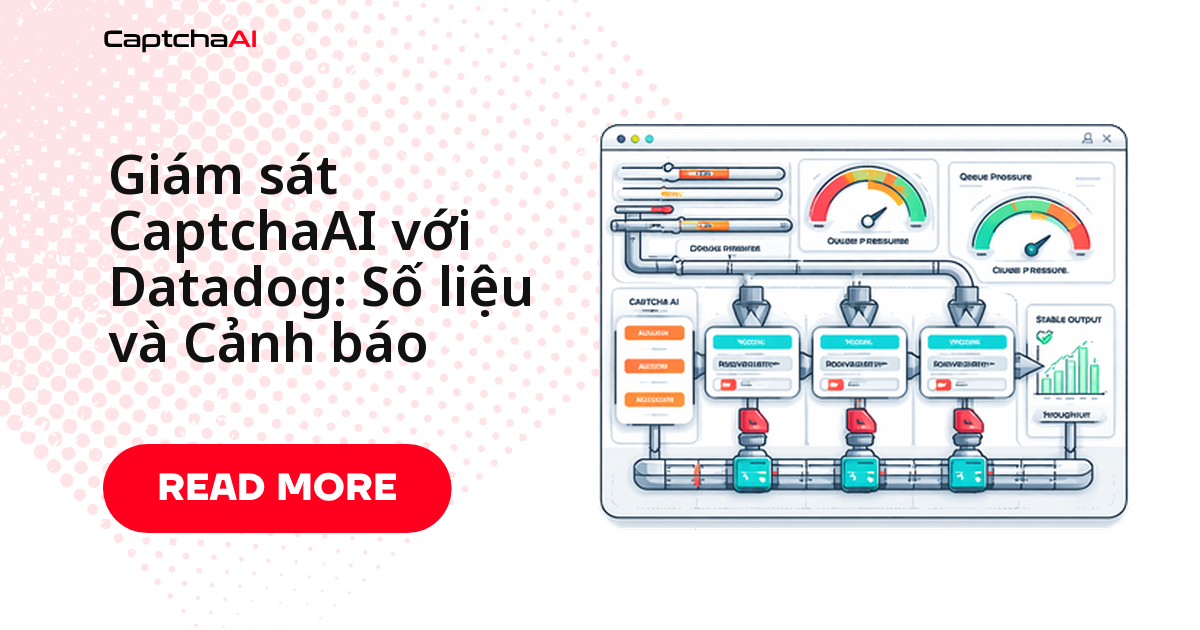
Sự cố trong pipeline giải CAPTCHA hiếm khi báo trước — số dư cạn dần, một loại lỗi tăng đột biến, hoặc worker treo lặng lẽ — và thường bạn chỉ biết khi ticket hỗ trợ đầu tiên đổ về. Gắn 7 số liệu cốt lõi vào Datadog cho bạn thấy tỷ lệ giải thành công, độ trễ theo percentile, phân bổ lỗi theo loại và số dư API theo thời gian thực, cộng với cảnh báo trước khi quy trình gãy.
Ví dụ: một đội QA thuê ngoài kiểm thử checkout trên staging — thiếu dashboard, một đợt token hết hạn hàng loạt có thể trôi qua hàng giờ mới bị phát hiện.
Số liệu Datadog nên theo dõi cho pipeline CaptchaAI
| Số liệu | Loại | Vì sao quan trọng |
|---|---|---|
captcha.solve.count |
Counter | Tổng số task đã gửi |
captcha.solve.success |
Counter | Số lần giải thành công |
captcha.solve.error |
Counter | Số lần giải thất bại (theo loại) |
captcha.solve.latency |
Histogram | Thời gian từ lúc gửi đến khi có kết quả |
captcha.queue.depth |
Gauge | Số task đang chờ |
captcha.balance |
Gauge | Số dư API còn lại |
captcha.worker.active |
Gauge | Số worker đang hoạt động |
Lỗi giám sát thường gặp trước khi bắt tay vào setup
| Vấn đề | Nguyên nhân | Cách xử lý |
|---|---|---|
| Không thấy số liệu lên Datadog | Agent (DogStatsD) chưa chạy | Kiểm tra DD_AGENT_HOST; chạy docker ps kiểm tra agent |
| Biểu đồ latency trống | Chưa ghi nhận lần giải thành công | Xác nhận statsd.histogram() gọi ở nhánh thành công |
| Thiếu tag trên số liệu | Sai định dạng tag | Dùng đúng key:value; không khoảng trắng trong tag |
| Số liệu bị nhân đôi | Nhiều tiến trình cùng gửi report | Chỉ để một tiến trình báo cáo số dư mỗi lần triển khai |
Python – tích hợp DogStatsD
Cách gọn nhất là bọc hàm giải bằng một decorator: mỗi lần gọi tự động tăng counter, đo latency và gắn tag theo loại CAPTCHA.
import os
import time
import functools
import requests
from datadog import initialize, statsd

# Initialize Datadog
initialize(
    statsd_host=os.environ.get("DD_AGENT_HOST", "localhost"),
    statsd_port=int(os.environ.get("DD_DOGSTATSD_PORT", "8125"))
)

API_KEY = os.environ["CAPTCHAAI_API_KEY"]
session = requests.Session()

def track_captcha_metrics(captcha_type="recaptcha_v2"):
    """Decorator to track solve metrics."""
    def decorator(func):
        @functools.wraps(func)
        def wrapper(*args, **kwargs):
            tags = [f"captcha_type:{captcha_type}"]
            statsd.increment("captcha.solve.count", tags=tags)

            start = time.time()
            try:
                result = func(*args, **kwargs)
                elapsed = time.time() - start

                if "solution" in result:
                    statsd.increment("captcha.solve.success", tags=tags)
                    statsd.histogram("captcha.solve.latency", elapsed, tags=tags)
                else:
                    error = result.get("error", "unknown")
                    statsd.increment(
                        "captcha.solve.error",
                        tags=tags + [f"error:{error}"]
                    )
                return result
            except Exception as e:
                statsd.increment(
                    "captcha.solve.error",
                    tags=tags + [f"error:{type(e).__name__}"]
                )
                raise
        return wrapper
    return decorator

@track_captcha_metrics(captcha_type="recaptcha_v2")
def solve_recaptcha(sitekey, pageurl):
    resp = session.post("https://ocr.captchaai.com/in.php", data={
        "key": API_KEY,
        "method": "userrecaptcha",
        "googlekey": sitekey,
        "pageurl": pageurl,
        "json": 1
    })
    data = resp.json()
    if data.get("status") != 1:
        return {"error": data.get("request")}

    captcha_id = data["request"]
    for _ in range(60):
        time.sleep(5)
        result = session.get("https://ocr.captchaai.com/res.php", params={
            "key": API_KEY, "action": "get", "id": captcha_id, "json": 1
        }).json()
        if result.get("status") == 1:
            return {"solution": result["request"]}
        if result.get("request") != "CAPCHA_NOT_READY":
            return {"error": result.get("request")}
    return {"error": "TIMEOUT"}

def report_balance():
    """Send balance as a gauge metric."""
    resp = session.get("https://ocr.captchaai.com/res.php", params={
        "key": API_KEY, "action": "getbalance", "json": 1
    })
    data = resp.json()
    if data.get("status") == 1:
        balance = float(data["request"])
        statsd.gauge("captcha.balance", balance)
        return balance
    return None

def report_queue_depth(depth):
    """Report current queue depth."""
    statsd.gauge("captcha.queue.depth", depth)

def report_worker_count(active, total):
    """Report worker health."""
    statsd.gauge("captcha.worker.active", active)
    statsd.gauge("captcha.worker.total", total)
report_balance(), report_queue_depth() và report_worker_count() không gắn với task cụ thể — gọi theo lịch (cron) mỗi 30–60 giây là đủ.
JavaScript – tích hợp Datadog
Bản Node.js dùng thư viện hot-shots để đẩy số liệu tới DogStatsD.
const { StatsD } = require("hot-shots");
const axios = require("axios");

const API_KEY = process.env.CAPTCHAAI_API_KEY;

const dogstatsd = new StatsD({
  host: process.env.DD_AGENT_HOST || "localhost",
  port: parseInt(process.env.DD_DOGSTATSD_PORT || "8125", 10),
  prefix: "captcha.",
  globalTags: [`env:${process.env.NODE_ENV || "development"}`],
});

async function solveCaptchaWithMetrics(sitekey, pageurl, captchaType = "recaptcha_v2") {
  const tags = [`captcha_type:${captchaType}`];
  dogstatsd.increment("solve.count", 1, tags);
  const startTime = Date.now();

  try {
    const result = await solveCaptcha(sitekey, pageurl);
    const elapsed = (Date.now() - startTime) / 1000;

    if (result.solution) {
      dogstatsd.increment("solve.success", 1, tags);
      dogstatsd.histogram("solve.latency", elapsed, tags);
    } else {
      dogstatsd.increment("solve.error", 1, [...tags, `error:${result.error}`]);
    }

    return result;
  } catch (err) {
    dogstatsd.increment("solve.error", 1, [...tags, `error:${err.message}`]);
    throw err;
  }
}

async function solveCaptcha(sitekey, pageurl) {
  const submitResp = await axios.post("https://ocr.captchaai.com/in.php", null, {
    params: {
      key: API_KEY,
      method: "userrecaptcha",
      googlekey: sitekey,
      pageurl: pageurl,
      json: 1,
    },
  });

  if (submitResp.data.status !== 1) {
    return { error: submitResp.data.request };
  }

  const captchaId = submitResp.data.request;
  for (let i = 0; i < 60; i++) {
    await new Promise((r) => setTimeout(r, 5000));
    const pollResp = await axios.get("https://ocr.captchaai.com/res.php", {
      params: { key: API_KEY, action: "get", id: captchaId, json: 1 },
    });
    if (pollResp.data.status === 1) return { solution: pollResp.data.request };
    if (pollResp.data.request !== "CAPCHA_NOT_READY") {
      return { error: pollResp.data.request };
    }
  }
  return { error: "TIMEOUT" };
}

async function reportBalance() {
  try {
    const resp = await axios.get("https://ocr.captchaai.com/res.php", {
      params: { key: API_KEY, action: "getbalance", json: 1 },
    });
    if (resp.data.status === 1) {
      const balance = parseFloat(resp.data.request);
      dogstatsd.gauge("balance", balance);
      return balance;
    }
  } catch (err) {
    console.error("Balance check failed:", err.message);
  }
  return null;
}

// Report balance every minute
setInterval(reportBalance, 60000);

module.exports = { solveCaptchaWithMetrics, reportBalance };
setInterval phù hợp cho service chạy dài hạn; với serverless (AWS Lambda, Azure Functions), gọi reportBalance() từ cron job riêng thay vì setInterval.
Dựng dashboard Datadog bằng JSON mẫu
Import trực tiếp JSON dưới đây vào Datadog để có ngay dashboard giám sát CAPTCHA, không cần kéo-thả từng widget:
{
  "title": "CaptchaAI Pipeline",
  "widgets": [
    {
      "definition": {
        "type": "timeseries",
        "title": "Solve Rate (Success vs Error)",
        "requests": [
          {"q": "sum:captcha.solve.success{*}.as_count()"},
          {"q": "sum:captcha.solve.error{*}.as_count()"}
        ]
      }
    },
    {
      "definition": {
        "type": "timeseries",
        "title": "Solve Latency (p50, p95, p99)",
        "requests": [
          {"q": "avg:captcha.solve.latency{*}"},
          {"q": "percentile:captcha.solve.latency{*},0.95"},
          {"q": "percentile:captcha.solve.latency{*},0.99"}
        ]
      }
    },
    {
      "definition": {
        "type": "query_value",
        "title": "API Balance",
        "requests": [{"q": "avg:captcha.balance{*}"}]
      }
    },
    {
      "definition": {
        "type": "timeseries",
        "title": "Queue Depth",
        "requests": [{"q": "avg:captcha.queue.depth{*}"}]
      }
    }
  ]
}
Đặt cảnh báo (alert) cho từng ngưỡng rủi ro
Cảnh báo tối thiểu trước khi đưa pipeline vào production:
| Cảnh báo | Điều kiện | Mức độ |
|---|---|---|
| Số dư thấp | captcha.balance < 10 |
Warning |
| Số dư nguy cấp | captcha.balance < 2 |
Critical |
| Tỷ lệ lỗi cao | Tỷ lệ lỗi > 10% trong 5 phút | Warning |
| Độ trễ tăng vọt | p95 latency > 120 giây trong 10 phút | Warning |
| Hàng đợi dồn ứ | Độ sâu hàng đợi > 100 và tăng liên tục trong 5 phút | Warning |
| Worker ngừng hoạt động | captcha.worker.active == 0 |
Critical |
Tạo monitor qua API Datadog bằng YAML — dùng làm mẫu cho các dòng còn lại:
# Datadog monitor definition (API create)
- type: metric alert
  name: "CaptchaAI Low Balance"
  query: "avg(last_5m):avg:captcha.balance{*} < 10"
  message: "CaptchaAI balance is low: {{value}}. Top up to avoid solve failures."
  tags:

    - team:scraping
    - service:captcha
Câu hỏi thường gặp
Ngưỡng số dư bao nhiêu thì nên bật cảnh báo?
Không có số chung cho mọi team: đặt warning ở mức đủ chạy 24–48 giờ, critical ở mức chỉ đủ vài giờ. Mẫu captcha.balance < 10 / < 2 phù hợp pipeline vừa; đội chạy khối lượng lớn nên nhân ngưỡng lên.
Có cần một Datadog Agent cho từng worker không?
Không — một Agent (DogStatsD) mỗi máy chủ là đủ; worker trên máy đó gửi số liệu tới agent local, agent chuyển tiếp lên Datadog.
Polling hay callback giúp đo latency chính xác hơn?
Polling dễ đo hơn: ghi timestamp quanh vòng lặp res.php như ví dụ trên. Với callback/webhook, bạn phải tự chèn timestamp lúc gửi và lúc nhận.
Custom metrics của Datadog có tốn phí không, và có nên dùng APM trace thay thế?
Có, theo custom metric time series — nhưng 7 số liệu trong bài thường nằm trong hạn mức miễn phí. ddtrace cho tracing tự động, ít cấu hình hơn; custom metrics vẫn kiểm soát tốt hơn việc tổng hợp và cảnh báo.
Bước tiếp theo
Đưa khả năng quan sát vào pipeline CAPTCHA — lấy API key CaptchaAI rồi kết nối với Datadog theo hướng dẫn trên.
Hướng dẫn liên quan: