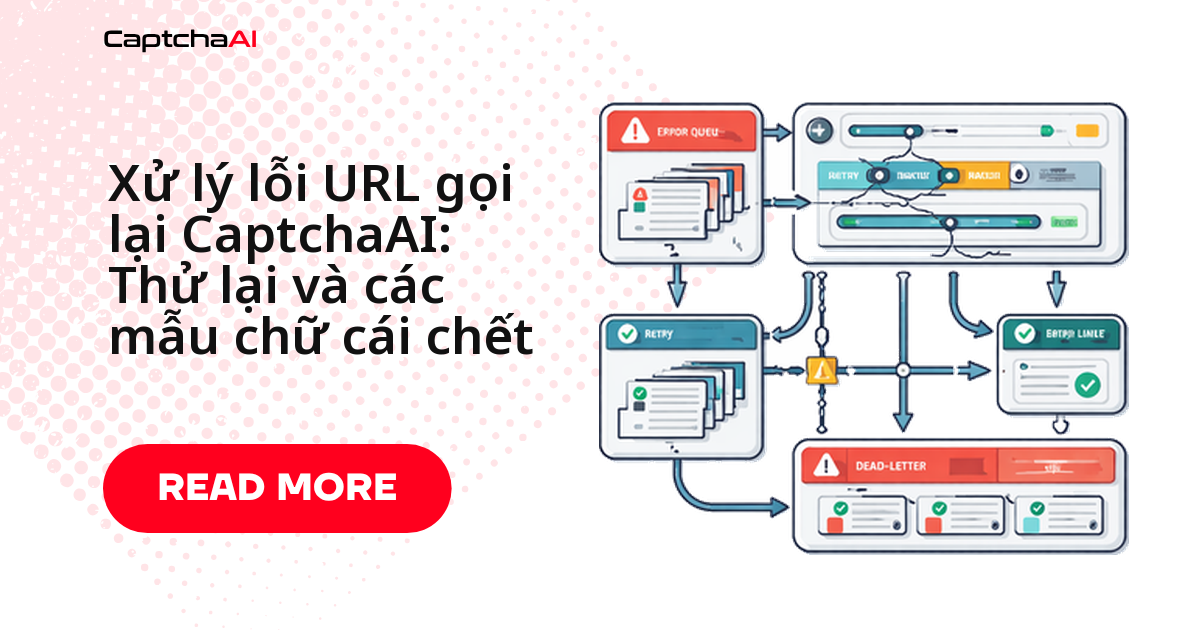
Callback (pingback) của CaptchaAI không đảm bảo giao đến — server của bạn có thể sập, trả về lỗi 5xx, hoặc handler crash đúng lúc CaptchaAI gửi kết quả về. Bài này đưa ra 3 mẫu xử lý cụ thể, kèm code Python và JavaScript chạy ngay:
- Callback + polling dự phòng — poll lại task nào chưa nhận callback sau một khoảng timeout.
- Hàng đợi thư chết (dead-letter queue) — không mất kết quả khi handler xử lý lỗi, lưu lại để retry sau.
- Trình xử lý idempotent — xử lý callback trùng lặp mà không sinh lỗi hay dữ liệu sai.
Tình huống thực tế: đội QA thuê ngoài ở TP.HCM
Một đội QA thuê ngoài ở TP.HCM chạy hàng nghìn task giải reCAPTCHA mỗi đêm cho khách hàng nước ngoài, trên một VPS giá rẻ tự động restart theo lịch lúc nửa đêm giờ Việt Nam — đúng lúc batch job đang chờ callback. Không có polling dự phòng, cả lô task đêm đó mất kết quả mà không ai biết cho tới sáng hôm sau. Ba mẫu dưới đây tồn tại vì lý do đó.
Các lỗi callback thường gặp
Server sập
CaptchaAI nhận "connection refused" khi cố gửi callback về — kết quả không được giao.
Server trả về mã 5xx
CaptchaAI nhận response lỗi; có thể không thử gửi lại tùy cách CaptchaAI triển khai retry.
Timeout mạng
Kết nối từ CaptchaAI bị treo giữa chừng — kết quả có thể bị mất mà không để lại log lỗi rõ ràng.
Handler crash
Request được nhận nhưng kết quả chưa lưu kịp trước khi handler crash — lỗi âm thầm, khó phát hiện nhất trong 4 loại trên.
Nguyên tắc: không bao giờ chỉ dựa vào callback. Luôn có một cơ chế dự phòng.
Mẫu 1: Callback kết hợp polling dự phòng
Cách đáng tin cậy nhất: chấp nhận callback ngay khi đến, đồng thời polling cho bất kỳ task nào chưa nhận được callback trong một khoảng thời gian nhất định.
Python
import os
import time
import threading
import requests
from flask import Flask, request

app = Flask(__name__)
API_KEY = os.environ["CAPTCHAAI_API_KEY"]

# Track task state
pending_tasks = {}  # task_id -> {"submitted_at": timestamp, "status": "pending"}
results = {}
lock = threading.Lock()

def submit_captcha(sitekey, pageurl, callback_url):
    """Submit with callback, but track for fallback polling."""
    resp = requests.post("https://ocr.captchaai.com/in.php", data={
        "key": API_KEY,
        "method": "userrecaptcha",
        "googlekey": sitekey,
        "pageurl": pageurl,
        "pingback": callback_url,
        "json": 1
    })
    data = resp.json()

    if data.get("status") == 1:
        task_id = data["request"]
        with lock:
            pending_tasks[task_id] = {
                "submitted_at": time.time(),
                "status": "pending"
            }
        return task_id
    return None

@app.route("/callback")
def captcha_callback():
    """Primary result delivery — CaptchaAI sends results here."""
    task_id = request.args.get("id")
    solution = request.args.get("code")

    with lock:
        results[task_id] = solution
        pending_tasks.pop(task_id, None)

    return "OK", 200

def fallback_poller():
    """Poll for any tasks that missed their callback."""
    while True:
        time.sleep(30)  # Check every 30 seconds

        with lock:
            stale_tasks = [
                tid for tid, info in pending_tasks.items()
                if time.time() - info["submitted_at"] > 120  # 2 min callback timeout
                and info["status"] == "pending"
            ]

        for task_id in stale_tasks:
            resp = requests.get("https://ocr.captchaai.com/res.php", params={
                "key": API_KEY,
                "action": "get",
                "id": task_id,
                "json": 1
            })
            data = resp.json()

            if data.get("status") == 1:
                with lock:
                    results[task_id] = data["request"]
                    pending_tasks.pop(task_id, None)
                print(f"Fallback poll recovered: {task_id}")
            elif data.get("request") != "CAPCHA_NOT_READY":
                # Permanent error — remove from pending
                with lock:
                    pending_tasks.pop(task_id, None)
                print(f"Task failed: {task_id} — {data.get('request')}")

# Start fallback poller in background
poller_thread = threading.Thread(target=fallback_poller, daemon=True)
poller_thread.start()
JavaScript
const express = require("express");
const axios = require("axios");

const app = express();
const API_KEY = process.env.CAPTCHAAI_API_KEY;

const pendingTasks = new Map(); // taskId -> { submittedAt, status }
const results = new Map();

async function submitCaptcha(sitekey, pageurl, callbackUrl) {
  const resp = await axios.post("https://ocr.captchaai.com/in.php", null, {
    params: {
      key: API_KEY,
      method: "userrecaptcha",
      googlekey: sitekey,
      pageurl: pageurl,
      pingback: callbackUrl,
      json: 1,
    },
  });

  if (resp.data.status === 1) {
    const taskId = resp.data.request;
    pendingTasks.set(taskId, {
      submittedAt: Date.now(),
      status: "pending",
    });
    return taskId;
  }
  return null;
}

// Primary callback endpoint
app.get("/callback", (req, res) => {
  const taskId = req.query.id;
  const solution = req.query.code;

  results.set(taskId, solution);
  pendingTasks.delete(taskId);

  res.sendStatus(200);
});

// Fallback poller
setInterval(async () => {
  const now = Date.now();
  const staleTasks = [];

  for (const [taskId, info] of pendingTasks) {
    if (now - info.submittedAt > 120000 && info.status === "pending") {
      staleTasks.push(taskId);
    }
  }

  for (const taskId of staleTasks) {
    try {
      const resp = await axios.get("https://ocr.captchaai.com/res.php", {
        params: { key: API_KEY, action: "get", id: taskId, json: 1 },
      });

      if (resp.data.status === 1) {
        results.set(taskId, resp.data.request);
        pendingTasks.delete(taskId);
        console.log(`Fallback recovered: ${taskId}`);
      } else if (resp.data.request !== "CAPCHA_NOT_READY") {
        pendingTasks.delete(taskId);
        console.log(`Task failed: ${taskId} — ${resp.data.request}`);
      }
    } catch (err) {
      console.error(`Poll error for ${taskId}: ${err.message}`);
    }
  }
}, 30000);

app.listen(3000);
Mẫu 2: Hàng đợi thư chết (dead-letter queue)
Khi handler xử lý callback nhưng gặp lỗi (database sập, dữ liệu không hợp lệ), đừng để mất kết quả — chuyển task đó sang hàng đợi thư chết để xử lý lại sau, thay vì bỏ luôn.
Python
import json
import os
import time
from pathlib import Path

DEAD_LETTER_DIR = Path("dead_letter")
DEAD_LETTER_DIR.mkdir(exist_ok=True)

@app.route("/callback")
def captcha_callback_with_dlq():
    task_id = request.args.get("id")
    solution = request.args.get("code")

    try:
        # Attempt normal processing
        store_result(task_id, solution)
        return "OK", 200
    except Exception as e:
        # Processing failed — save to dead-letter queue
        dead_letter = {
            "task_id": task_id,
            "solution": solution,
            "error": str(e),
            "received_at": time.time()
        }
        dlq_path = DEAD_LETTER_DIR / f"{task_id}.json"
        dlq_path.write_text(json.dumps(dead_letter))

        print(f"DLQ: {task_id} — {e}")
        return "OK", 200  # Still return 200 to CaptchaAI

def reprocess_dead_letters():
    """Retry processing dead-letter items."""
    for dlq_file in DEAD_LETTER_DIR.glob("*.json"):
        item = json.loads(dlq_file.read_text())

        try:
            store_result(item["task_id"], item["solution"])
            dlq_file.unlink()  # Remove after successful processing
            print(f"DLQ reprocessed: {item['task_id']}")
        except Exception:
            pass  # Leave in DLQ for next retry
JavaScript
const fs = require("fs");
const path = require("path");

const DLQ_DIR = path.join(__dirname, "dead_letter");
if (!fs.existsSync(DLQ_DIR)) fs.mkdirSync(DLQ_DIR);

app.get("/callback-dlq", (req, res) => {
  const taskId = req.query.id;
  const solution = req.query.code;

  try {
    storeResult(taskId, solution);
    res.sendStatus(200);
  } catch (err) {
    // Save to dead-letter queue
    const deadLetter = {
      task_id: taskId,
      solution: solution,
      error: err.message,
      received_at: Date.now(),
    };

    fs.writeFileSync(
      path.join(DLQ_DIR, `${taskId}.json`),
      JSON.stringify(deadLetter)
    );

    console.log(`DLQ: ${taskId} — ${err.message}`);
    res.sendStatus(200); // Still acknowledge to CaptchaAI
  }
});

function reprocessDeadLetters() {
  const files = fs.readdirSync(DLQ_DIR).filter((f) => f.endsWith(".json"));

  for (const file of files) {
    const filePath = path.join(DLQ_DIR, file);
    const item = JSON.parse(fs.readFileSync(filePath, "utf8"));

    try {
      storeResult(item.task_id, item.solution);
      fs.unlinkSync(filePath);
      console.log(`DLQ reprocessed: ${item.task_id}`);
    } catch (err) {
      // Leave in DLQ
    }
  }
}

// Retry DLQ every 5 minutes
setInterval(reprocessDeadLetters, 300000);
Mẫu 3: Trình xử lý callback dạng idempotent
CaptchaAI có thể gửi cùng một callback nhiều lần (retry phía CaptchaAI, mạng chập chờn…). Trình xử lý cần idempotent — chạy lại bao nhiêu lần cũng chỉ ra đúng một kết quả:
@app.route("/callback")
def idempotent_callback():
    task_id = request.args.get("id")
    solution = request.args.get("code")

    with lock:
        # Only process if not already handled
        if task_id in results:
            return "OK", 200  # Already processed — skip silently

        results[task_id] = solution
        pending_tasks.pop(task_id, None)

    return "OK", 200
Khắc phục sự cố
Các lỗi thường gặp khi vận hành ba mẫu trên và cách xử lý:
Polling dự phòng tìm thấy task đã được giao trước đó
Nguyên nhân: race condition giữa callback và polling. Cách xử lý: thêm kiểm tra idempotency, bỏ qua nếu đã có kết quả.
Dead-letter queue phình to mà không được xử lý lại
Nguyên nhân: reprocessor không chạy hoặc bị lỗi. Cách xử lý: kiểm tra log reprocessor; xử lý dứt điểm nguyên nhân gốc (thường là DB).
Callback trả về 200 nhưng kết quả vẫn mất
Nguyên nhân: handler crash sau khi đã phản hồi. Cách xử lý: xử lý xong dữ liệu rồi mới phản hồi, hoặc dùng mẫu DLQ.
Quá nhiều request polling dự phòng
Nguyên nhân: quá nhiều task bị coi là "cũ". Cách xử lý: tăng ngưỡng timeout callback; kiểm tra uptime server.
Chọn mẫu nào cho hệ thống của bạn
Ba mẫu trên không loại trừ nhau — chọn theo khối lượng task và mức độ khắt khe của SLA:
- Khối lượng thấp, thỉnh thoảng downtime → callback + polling dự phòng.
- Khối lượng lớn, có nguy cơ mất kết nối database → hàng đợi thư chết.
- Nhiều consumer có thể cùng xử lý một kết quả → trình xử lý idempotent.
- Hệ thống production có SLA → kết hợp cả ba.
Câu hỏi thường gặp
Có nên luôn trả về 200 cho callback CaptchaAI, kể cả khi xử lý nội bộ bị lỗi?
Có. Trả mã lỗi (4xx/5xx) không giúp ích gì — CaptchaAI có thể không thử gửi lại callback. Luôn trả 200 ngay khi nhận được, còn lỗi xử lý nội bộ thì xử lý bằng DLQ hoặc polling dự phòng.
Nên đợi bao lâu trước khi kích hoạt polling dự phòng?
Tối thiểu 120 giây kể từ lúc gửi task. Phần lớn CAPTCHA giải xong trong 10–60 giây; khoảng thời gian còn lại là để trừ hao độ trễ mạng khi CaptchaAI gửi callback về.
Nên lưu trạng thái pending_tasks và dead-letter queue ở đâu khi chạy nhiều instance?
Không nên dùng biến trong bộ nhớ (dict/Map) như ví dụ trên nếu chạy nhiều instance song song — mỗi instance có bản trạng thái riêng, dễ trùng hoặc sót task. Chuyển sang Redis hoặc một bảng database dùng chung để tất cả instance đọc/ghi cùng trạng thái.
Làm sao biết endpoint /callback của mình có nhận đúng request từ CaptchaAI không?
Ghi log toàn bộ request đến trước khi xử lý (task_id, code, thời điểm) và đối chiếu với task_id đã submit. Nếu log trống dù task đã gửi từ lâu, khả năng cao là firewall/NAT đang chặn IP của CaptchaAI hoặc server chưa mở public port cho route callback.
Dead-letter queue nên lưu bằng file JSON, Redis hay database?
File JSON đủ dùng cho khối lượng nhỏ, dễ kiểm tra thủ công. Ở quy mô lớn hơn, chuyển sang Redis (TTL tự động) hoặc một bảng database riêng để dễ giám sát và dọn dẹp theo lịch.
Bài viết liên quan
- Các mẫu xử lý lỗi và retry khi giải CAPTCHA bằng Python
- Bảo mật webhook: xác thực callback CaptchaAI
- Tra cứu mã lỗi CaptchaAI
Bước tiếp theo
Triển khai callback handler chịu lỗi tốt cho hệ thống của bạn — lấy API key CaptchaAI và áp dụng các mẫu polling dự phòng, dead-letter queue, idempotent handler ở trên.
Hướng dẫn liên quan: