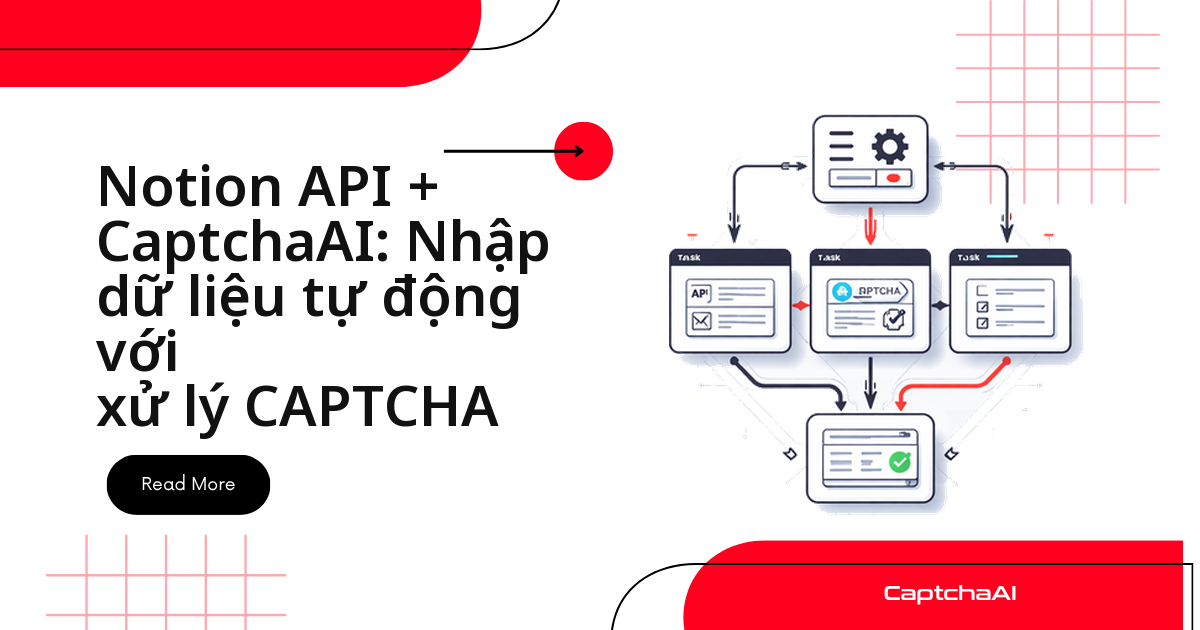
Nếu team QA hoặc data đang quản lý danh sách URL bằng Notion, bạn có thể biến chính database đó thành hàng đợi giải CAPTCHA — không cần dựng thêm Redis hay hàng đợi riêng.
Notion lưu URL, sitekey và trạng thái từng task. Một script đọc các dòng Pending, gửi sitekey/URL sang CaptchaAI để giải, rồi ghi token ngược lại vào đúng bản ghi.
Khi nào nên dùng Notion làm hàng đợi CAPTCHA
Cách này phù hợp nhất với team nhỏ — ví dụ nhóm QA hoặc data tại một công ty outsourcing ở TP.HCM đang theo dõi vài chục URL khách hàng, một số trang có reCAPTCHA v2. Thay vì dựng database riêng, họ dùng Notion — nơi cả team đã quen thao tác — làm nơi lưu task: đọc dòng Pending → gửi sitekey/URL sang CaptchaAI → ghi token và trạng thái mới ngược lại vào đúng bản ghi.
Vài trăm task/ngày thì Notion đủ nhanh. Từ vài chục nghìn task/ngày trở lên, tách phần polling CaptchaAI sang một worker riêng và chuyển sang hàng đợi chuyên dụng (Redis, SQS) để tránh nghẽn ở rate limit của Notion.
Điều kiện cần chuẩn bị
Trước khi bắt đầu: một Notion integration (Internal integration, tạo tại developers.notion.com), một database đã share với integration đó, API key CaptchaAI, và Python 3.8+ hoặc Node.js 18+.
Dựng cơ sở dữ liệu Notion
Tạo Notion database với các property sau:
| Property | Kiểu dữ liệu | Vai trò |
|---|---|---|
Name |
Title | Mã định danh task |
URL |
URL | Trang đích có CAPTCHA |
Sitekey |
Rich text | sitekey của reCAPTCHA |
Status |
Select | Pending, Solving, Solved, Failed |
Token |
Rich text | Token CAPTCHA sau khi giải |
Solved At |
Date | Thời điểm giải xong |
Error |
Rich text | Thông báo lỗi nếu task thất bại |
Vì sao tên property phải giữ nguyên như bảng
Notion phân biệt chữ hoa/chữ thường trong tên property. Đổi Sitekey thành "Khóa trang web" hay Status thành "Trạng thái" sẽ khiến code bên dưới không tìm thấy property đó và báo lỗi ngay ở bước đọc task. Giữ nguyên tên tiếng Anh; diễn giải ý nghĩa bằng tiếng Việt ở cột Vai trò là đủ.
Sau khi tạo xong, share database với Notion integration của bạn — bỏ qua bước này là nguyên nhân phổ biến nhất gây lỗi 401 ở phần sau.
Cách triển khai bằng Python
Script dưới đọc các task Pending, gửi từng cặp sitekey/URL sang CaptchaAI, rồi ghi token hoặc thông báo lỗi ngược lại vào Notion:
# notion_captcha_worker.py
import os
import time
import requests

NOTION_TOKEN = os.environ.get("NOTION_TOKEN")
NOTION_DB_ID = os.environ.get("NOTION_DB_ID")
CAPTCHAAI_KEY = os.environ.get("CAPTCHAAI_KEY", "YOUR_API_KEY")

NOTION_HEADERS = {
    "Authorization": f"Bearer {NOTION_TOKEN}",
    "Content-Type": "application/json",
    "Notion-Version": "2022-06-28",
}

def get_pending_tasks():
    """Fetch tasks with Status = Pending from Notion."""
    url = f"https://api.notion.com/v1/databases/{NOTION_DB_ID}/query"
    payload = {
        "filter": {
            "property": "Status",
            "select": {"equals": "Pending"},
        }
    }
    resp = requests.post(url, headers=NOTION_HEADERS, json=payload)
    resp.raise_for_status()
    return resp.json()["results"]

def update_task(page_id, properties):
    """Update a Notion page with new property values."""
    url = f"https://api.notion.com/v1/pages/{page_id}"
    payload = {"properties": properties}
    resp = requests.patch(url, headers=NOTION_HEADERS, json=payload)
    resp.raise_for_status()

def set_status(page_id, status, token=None, error=None):
    """Update task status in Notion."""
    props = {"Status": {"select": {"name": status}}}

    if token:
        props["Token"] = {"rich_text": [{"text": {"content": token[:2000]}}]}
        props["Solved At"] = {"date": {"start": time.strftime("%Y-%m-%dT%H:%M:%S")}}

    if error:
        props["Error"] = {"rich_text": [{"text": {"content": error[:200]}}]}

    update_task(page_id, props)

def solve_captcha(sitekey, pageurl):
    """Submit to CaptchaAI and poll for result."""
    # Submit
    resp = requests.get("https://ocr.captchaai.com/in.php", params={
        "key": CAPTCHAAI_KEY,
        "method": "userrecaptcha",
        "googlekey": sitekey,
        "pageurl": pageurl,
        "json": "1",
    })
    result = resp.json()

    if result.get("status") != 1:
        raise Exception(f"Submit failed: {result.get('request')}")

    task_id = result["request"]

    # Poll
    time.sleep(15)
    for _ in range(25):
        poll = requests.get("https://ocr.captchaai.com/res.php", params={
            "key": CAPTCHAAI_KEY,
            "action": "get",
            "id": task_id,
            "json": "1",
        })
        poll_result = poll.json()

        if poll_result.get("status") == 1:
            return poll_result["request"]
        if poll_result.get("request") != "CAPCHA_NOT_READY":
            raise Exception(f"Solve failed: {poll_result.get('request')}")

        time.sleep(5)

    raise Exception("Polling timeout")

def extract_property(page, prop_name, prop_type="rich_text"):
    """Extract a property value from a Notion page."""
    prop = page["properties"].get(prop_name, {})
    if prop_type == "rich_text":
        texts = prop.get("rich_text", [])
        return texts[0]["plain_text"] if texts else ""
    elif prop_type == "url":
        return prop.get("url", "")
    return ""

def main():
    tasks = get_pending_tasks()
    print(f"Found {len(tasks)} pending tasks")

    for task in tasks:
        page_id = task["id"]
        sitekey = extract_property(task, "Sitekey")
        pageurl = extract_property(task, "URL", "url")

        if not sitekey or not pageurl:
            set_status(page_id, "Failed", error="Missing sitekey or URL")
            continue

        print(f"Solving: {pageurl}")
        set_status(page_id, "Solving")

        try:
            token = solve_captcha(sitekey, pageurl)
            set_status(page_id, "Solved", token=token)
            print(f"  Solved successfully")
        except Exception as e:
            set_status(page_id, "Failed", error=str(e))
            print(f"  Failed: {e}")

        time.sleep(1)  # Rate limit for Notion API

    print("All tasks processed")

if __name__ == "__main__":
    main()
Chạy python notion_captcha_worker.py bất cứ khi nào cần xử lý các task đang chờ; cách chạy tự động theo lịch xem ở phần Câu hỏi thường gặp bên dưới.
Cách triển khai bằng Node.js
Logic giống hệt bản Python — dùng khi worker của bạn cần tích hợp vào một pipeline Node.js sẵn có:
// notion_captcha_worker.js
const { Client } = require('@notionhq/client');
const axios = require('axios');

const notion = new Client({ auth: process.env.NOTION_TOKEN });
const DB_ID = process.env.NOTION_DB_ID;
const API_KEY = process.env.CAPTCHAAI_KEY || 'YOUR_API_KEY';

async function getPendingTasks() {
  const response = await notion.databases.query({
    database_id: DB_ID,
    filter: { property: 'Status', select: { equals: 'Pending' } },
  });
  return response.results;
}

async function updateTask(pageId, status, token, error) {
  const properties = {
    Status: { select: { name: status } },
  };
  if (token) {
    properties.Token = { rich_text: [{ text: { content: token.slice(0, 2000) } }] };
    properties['Solved At'] = { date: { start: new Date().toISOString() } };
  }
  if (error) {
    properties.Error = { rich_text: [{ text: { content: error.slice(0, 200) } }] };
  }
  await notion.pages.update({ page_id: pageId, properties });
}

async function solveCaptcha(sitekey, pageurl) {
  const submit = await axios.get('https://ocr.captchaai.com/in.php', {
    params: {
      key: API_KEY, method: 'userrecaptcha',
      googlekey: sitekey, pageurl, json: '1',
    },
  });
  if (submit.data.status !== 1) throw new Error(submit.data.request);

  await new Promise(r => setTimeout(r, 15000));

  for (let i = 0; i < 25; i++) {
    const poll = await axios.get('https://ocr.captchaai.com/res.php', {
      params: { key: API_KEY, action: 'get', id: submit.data.request, json: '1' },
    });
    if (poll.data.status === 1) return poll.data.request;
    if (poll.data.request !== 'CAPCHA_NOT_READY') throw new Error(poll.data.request);
    await new Promise(r => setTimeout(r, 5000));
  }
  throw new Error('Timeout');
}

async function main() {
  const tasks = await getPendingTasks();
  console.log(`Found ${tasks.length} pending tasks`);

  for (const task of tasks) {
    const sitekey = task.properties.Sitekey?.rich_text?.[0]?.plain_text;
    const pageurl = task.properties.URL?.url;

    if (!sitekey || !pageurl) {
      await updateTask(task.id, 'Failed', null, 'Missing sitekey or URL');
      continue;
    }

    console.log(`Solving: ${pageurl}`);
    await updateTask(task.id, 'Solving');

    try {
      const token = await solveCaptcha(sitekey, pageurl);
      await updateTask(task.id, 'Solved', token);
      console.log('  Solved');
    } catch (e) {
      await updateTask(task.id, 'Failed', null, e.message);
      console.log(`  Failed: ${e.message}`);
    }

    await new Promise(r => setTimeout(r, 1000));
  }
}

main().catch(console.error);
Câu hỏi thường gặp
Cách thiết lập Notion integration ra sao?
Vào notion.so/my-integrations, tạo integration nội bộ, sao chép secret token vào NOTION_TOKEN, rồi share database với integration vừa tạo.
CaptchaAI có giải được hCaptcha hoặc GeeTest v4 để dùng trong worker này không?
Không. CaptchaAI hiện không hỗ trợ hCaptcha và FunCaptcha (Arkose Labs); GeeTest v4 chỉ đang ở trạng thái sắp ra mắt, chưa dùng được. Worker này chỉ nên gọi method cho các loại đã hỗ trợ.
Token bị Notion cắt bớt thì worker có báo lỗi không?
Không. rich_text của Notion cho phép tới 2000 ký tự, còn token CAPTCHA thường dưới 1000 ký tự — token[:2000] trong code chỉ là biện pháp phòng hờ, gần như không bao giờ kích hoạt.
Nếu script dừng giữa chừng, task đang ở trạng thái Solving có bị kẹt mãi không?
Có thể, vì Solving được ghi trước khi gọi CaptchaAI. Hai cách xử lý:
- Chạy lại worker định kỳ và coi task
Solvingquá lâu là cần retry - Lọc theo cột
Solved Atnếu cần theo dõi chặt hơn
Khắc phục sự cố
| Vấn đề | Nguyên nhân | Cách xử lý |
|---|---|---|
401 Unauthorized từ Notion |
Database chưa được share với integration | Share database với integration trong Notion |
| Property name không khớp | Notion phân biệt chữ hoa/chữ thường | Đặt tên property đúng như bảng ở phần thiết lập database |
| Token bị cắt bớt | rich_text của Notion giới hạn 2000 ký tự |
Token CAPTCHA thường dưới 1000 ký tự nên hiếm khi chạm giới hạn |
Notion rate limit (429) |
Gọi API quá nhiều trong thời gian ngắn | Thêm độ trễ 1 giây giữa các lần update (đã có trong code mẫu) |
Các bước tiếp theo
Biến Notion database của bạn thành hàng đợi giải CAPTCHA tự động — lấy API key CaptchaAI.
Hướng dẫn liên quan:
Bài viết liên quan
Đọc thêm về callback của reCAPTCHA v2 qua API, cách xử lý reCAPTCHA v2 và Turnstile trên cùng một site, và cơ chế callback của reCAPTCHA v2.